Why this session exists
Everyone in the company now has a Claude Teams seat. Most of us are using maybe 10% of it - as a fancier search box. This series changes that in six 45-minute sessions, going from "chat better" to "build your own automations". Today replaces six official Anthropic courses (about 4 hours of lectures): the working content is all here, taught in 45 minutes plus this page for self-study.
How AI actually works 7 min live
Four machine properties explain nearly every AI moment that ever surprised you: next-token prediction, knowledge, working memory, and steerability. Get these four and you can predict when Claude will be brilliant and when it will stumble - before it happens.
LiveWhat we mean by AI, and next-token prediction3 min▶
Claude is a large language model (LLM): a system trained on enormous amounts of text to do one deceptively simple thing - predict the next word, over and over, at incredible quality. It is not a database, not a search engine, and not a mind reader. Everything impressive and everything weird about AI flows from this one mechanic.
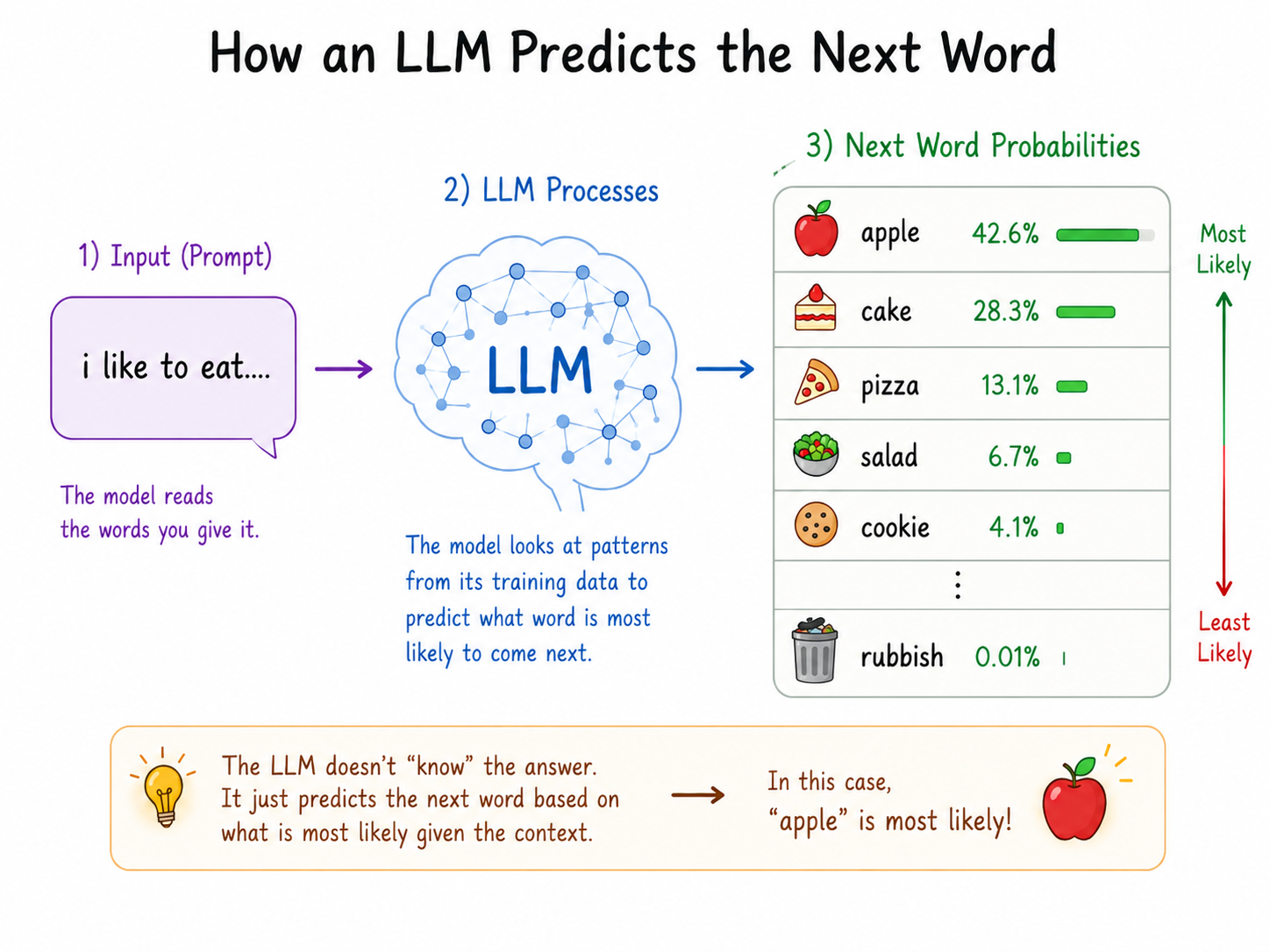
Because it predicts rather than looks up, the same prompt can produce different answers on different runs. That variability is a feature for brainstorming and a risk for facts - which is why verification habits matter (Part 3).
Why this matters to you
- It explains fluency without guarantees: Claude always sounds confident, because confident text is the most likely next text. Confidence is not evidence.
- It explains why giving material beats asking cold: prediction conditioned on YOUR document is anchored; prediction from nothing is educated guessing.
The same question, two ways. Ask Claude cold: "What was our company's Q2 revenue?" - it has no idea, and a weak prompt might get a confident-sounding guess. Now upload the quarterly report and ask: "Summarize this in 5 bullets for a team standup" - excellent, in seconds. Same tool; the difference is whether you gave it the facts to predict from.
Self-studyHow AI gets its character2 min read▶
Raw next-token prediction would happily continue any text, helpful or harmful, true or false. Models get their working personality in a second training phase: human feedback teaches the model which responses are helpful, honest, and safe. This is why Claude asks clarifying questions, declines some requests, and admits uncertainty - those behaviors were trained in deliberately.
- Different models, different characters: the same question to Claude, ChatGPT and Gemini gets different styles because each company trains different behavior, not because one "knows more".
- Character is steerable: your instructions layer on top. Tell Claude "be blunt, skip the caveats" or "challenge my assumptions" and it will - see Steerability below.
- Claude specifically is trained by Anthropic with an emphasis on being helpful, harmless, and honest - it would rather say "I'm not sure" than fabricate, but it is not immune to error. Trust calibrated, never blind.
LiveKnowledge - what Claude knows and when it invents2 min▶
Claude's built-in knowledge comes from training data with a cutoff date. It knows a compressed version of the public internet up to that point - and nothing after, nothing behind your company firewall, and nothing about your meeting this morning unless you paste it in.
When asked for facts beyond its knowledge, a language model's failure mode is not silence - it is hallucination: fluent, plausible, wrong. The fix is always the same: supply the source, ask it to cite what it used, and tell it that "I don't know" is an acceptable answer.
| Knowledge situation | What to do |
|---|---|
| Stable public concepts (statistics, marketing frameworks, code) | Ask directly - this is Claude's home turf |
| Recent events, prices, versions, news | Use search/research mode or paste the source in |
| Anything internal to the company | Always provide the document - it cannot know |
| High-stakes facts (legal, financial, published numbers) | Provide source + verify the output yourself |
The cautionary tale everyone should know: in 2023, two New York lawyers were sanctioned in court (Mata v. Avianca) for filing a legal brief containing six cases that an AI chatbot had simply invented - they never checked. The AI didn't fail; the verification step did. That story is why this whole session exists.
Self-studyWorking memory - the context window2 min read▶
Everything in your current conversation - your messages, uploaded files, Claude's replies - lives in a working memory called the context window. It is big (hundreds of pages) but finite, and two behaviors follow:
- Long chats drift. In a marathon conversation, early details fade in influence. When a thread gets messy, start fresh and paste in a short summary of decisions so far - a clean context beats a cluttered one.
- Each conversation starts blank. Claude does not remember yesterday's chat unless your workspace has that feature enabled or you re-supply the material. Projects (Part 2) exist precisely to solve this - persistent knowledge that every conversation can see.
A 300-page policy PDF dumped in whole gets shallow answers - the important clause on page 214 competes with 299 other pages for attention. Feed it chapter by chapter and ask for a running summary, and the answers get sharp. Same model, managed memory.
LiveSteerability - and when properties collide2 min▶
Steerability is the property that makes everything else usable: Claude will genuinely change its behavior - tone, format, depth, persona, rules - based on plain-language instructions. Most people dramatically under-steer. You can set rules for a whole conversation ("always answer in tables", "flag any assumption you make") and Claude will hold them.
When properties collide is where AI gets weird. Steer it hard toward confidence ("give me a definitive answer") and you suppress its honesty about uncertain knowledge - you have steered it INTO hallucination. Ask for perfect recall at the end of a very long chat and steering can't beat memory limits. Odd outputs are almost never random: one property is being pushed against another. Diagnose which, fix the prompt.
The arithmetic collision: "Total this 200-row expense list" in plain chat risks silent errors - you're asking a next-word predictor to be a calculator. Say "write and run the calculation as code" and it becomes exact, because now the right tool does the math. Knowing WHY it fails tells you the fix.
Driving Claude.ai 6 min live
The features that separate a power user from a search-box user: conversations that compound, Projects that remember, Artifacts that ship, and the reach features your Teams plan includes.
LiveYour first conversation, done properly2 min▶
A Claude conversation is a working session, not a query box. The habits that change everything:
- Talk to it like a bright new colleague - full sentences, real context, actual stakes. "Help me prep for a tense budget meeting with marketing tomorrow" beats "budget meeting tips".
- Attach, don't describe. Drop in the file (PDF, spreadsheet, screenshot, code) instead of describing it. Claude reads images and documents directly.
- Iterate in the same thread. "Shorter." "More formal." "Now as a table." Each follow-up refines - you are steering, not re-rolling dice.
- Edit your prompt when a thread goes sideways - rewriting your message and re-running beats arguing with a bad draft.
- Pick the right model: the default model balances speed and depth; switch to the most capable model for complex reasoning, the fast one for bulk simple tasks.
LiveProjects - knowledge that compounds2 min▶
A Project is a workspace with permanent memory: upload your team's key documents once, set standing instructions once, and every conversation inside the Project starts already knowing them. This is the single highest-leverage feature for teams - it turns Claude from a stranger into a briefed colleague.
What goes in a good project
- Knowledge files: style guides, product specs, org charts, glossaries, key reports - the stuff you're tired of re-explaining.
- Custom instructions: "You support the data science team at [company]. Our stack is X. Always flag assumptions. Use our metric definitions from the glossary."
- Team sharing: on the Teams plan, share the Project so everyone's conversations start equally briefed - one setup, whole-team payoff.
A brand team builds a "Brand HQ" project: voice guide, banned words, best past campaigns, current positioning doc. From then on, every caption, email, and deck request in that project comes back on-brand by default - no more pasting the style guide into every chat. We build exactly this in Demo 2.
LiveArtifacts and skills - from answers to assets1 min▶
Artifacts turn Claude's output into a live, standalone piece of work beside the chat: documents, tables, diagrams, working web pages, small interactive tools. Ask for "an interactive checklist my team can tick off" and you get a working mini-app, not a paragraph. Artifacts can be edited by conversation ("make the header plum, add a filter"), shared with a link, and are how we prototype websites in Session 4.
Skills are reusable instruction packs that teach Claude a repeatable job - your report format, your QA checklist, your SOP - so you invoke them instead of re-explaining. They are the star of Session 3, where we turn one of OUR real SOPs into a skill live.
Self-studyExpanding Claude's reach: connectors, search, research2 min read▶
- Connectors plug Claude into your tools - calendar, email, drive, project trackers - so it can read and act on live data. On our Teams plan most connectors need a one-time sys-admin approval; Session 2 includes the ready-to-send request template and builds the flagship automation (calendar → prioritized to-do list).
- Web search closes the knowledge-cutoff gap: Claude looks up current information and cites sources. Use it whenever "recent" matters.
- Research mode goes further: Claude plans a multi-step investigation, reads many sources, and returns a structured, cited report. Right for "compare these 5 vendors" - overkill for "what does churn mean".
- Enterprise search (when enabled by the org) lets Claude answer from internal company sources - ask your admin what's connected before assuming.
What this means Monday morning. Today, zero approvals needed: upload the weekly sales CSV and ask "find the 3 biggest outliers and draft one question to ask about each". After the Session 2 connector request: "check my calendar and inbox, build my morning to-do list, flag anything from the CEO" - automatically, every morning.
Self-studyClaude everywhere, and what your role uses it for2 min read▶
Beyond the browser: the desktop app adds Cowork (Claude works on files in a folder you choose) and hosts Claude Code for engineers; the mobile app handles voice conversations and photos of whiteboards; Claude also lives inside some tools your team already uses. Session 5 covers Claude Code properly - here's what each seat in this room reaches for first:
| Role | First wins with Claude |
|---|---|
| DS & AI | Code review and debugging, data cleaning plans, methodology critique, documentation drafts, offline script writing (Session 5) |
| Marketing & Branding | Campaign copy in brand voice, audience personas, content repurposing (one asset → 5 formats), creative critique (Session 4) |
| C-level | Board pre-reads, decision framing (options + risks + recommendation), meeting prep, "explain this technical thing before my next call" (Demo 3) |
| Everyone | Email drafts, meeting summaries → action lists, document review, "teach me" sessions, first drafts of anything |
The 4D framework, properly 6 min live
Anthropic's framework for working with AI effectively, efficiently, ethically and safely. Four competencies - Delegation, Description, Discernment, Diligence - each with real depth. This is the operating system for every demo in all six sessions.
LiveThe 4D map1 min▶
Why "fluency" and not "prompting"? Because prompting is only one D of four. Fluent people also choose the right work to hand over, judge outputs like an editor, and stay accountable for what ships. The four Ds, in working order:
LiveDelegation - choosing the right work to hand over1.5 min▶
Delegation has three layers, and most people skip the first two:
- Problem awareness: what are you actually trying to achieve, and what does "good" look like? Fuzzy goals produce fuzzy delegations.
- Platform awareness: what is AI genuinely good at (Part 1!) and which tool fits - chat, a Project, research mode, or a human colleague?
- Task delegation: split the work. Which parts go to Claude, which stay with you, which are collaborative ping-pong?
Project planning with delegation in mind
For any real project, list the tasks and mark each: AI-first (drafting, summarizing, structuring, variations), human-first (final judgment, relationships, confidential calls), or duet (AI drafts, you shape; you outline, AI expands). A campaign launch might delegate audience research summaries and copy variants, keep budget sign-off and partner negotiations, and duet the creative brief.
Press-release draft: delegate. Pricing decision: don't. The gray zone is where fluency shows: performance-review notes are a duet (Claude structures your raw observations; the judgment and the words that land stay yours).
LiveDescription - the prompting masterclass1.5 min▶
Description quality is the single biggest lever you control. Three kinds of describing, then the techniques:
- Product description: what you want - task, format, length, audience.
- Process description: how to work - "think step by step", "ask clarifying questions first", "give 3 options before committing".
- Performance description: how to behave - tone, persona, confidence level, what to do when unsure.
The six elements of a strong prompt
| Element | Sounds like |
|---|---|
| Role | "You are a head of data science preparing a board pre-read" |
| Context | "We are a [industry] company; here are the Q2 facts: ..." |
| Task | "Write a one-page performance summary" |
| Format | "3 sections, max 120 words each, end with the key trend" |
| Audience | "Non-technical board members with 3 minutes" |
| Guardrails | "Use ONLY these facts; list gaps instead of guessing" |
Techniques that punch above their weight
- Show an example of what good looks like (last week's report) - one example outperforms three paragraphs of description.
- Ask it to ask: "ask me up to 3 questions before you start" catches missing context early.
- Positive instructions: say what TO do ("plain, confident language") over what not to do ("don't be wordy").
LiveDiscernment - and the description-discernment loop1 min▶
Discernment is editorial judgment over three things: the product (is it right, complete, on-brand?), the process (did it reason soundly or leap?), and the performance (was the interaction style right - too agreeable, too verbose?).
The core working rhythm of AI fluency is the description-discernment loop: describe → get output → judge → describe better → repeat. First drafts are the start of the conversation, not the verdict. Specific feedback ("the tone in section 2 is alarmist - make it neutral and factual") beats re-rolling ("try again") every time.
A manager's weekly report draft calls a 3% dip "alarming" - off-brand for a numbers-driven team. Weak move: accept it or start over. Fluent move: "Neutral, factual phrasing on the dip; add the 8-week trend for context" - 15 seconds, and the next draft is right. That's the loop.
LiveDiligence - staying accountable1 min▶
Diligence is the D that protects your name and the company. Three parts:
- Creation diligence: be thoughtful about which AI you use for what, and what data you share with it. Company policy and client confidentiality come first - when in doubt, sanitize.
- Transparency diligence: be appropriately open about AI's role in your work - with colleagues, clients, and regulators where it matters. "Claude drafted, I verified and decided" is a sentence to be comfortable saying.
- Deployment diligence: verify before it ships. You own the output - the Avianca lawyers learned this in federal court.
Learn from Claude, then teach it forward 3 min live
The most underused mode of AI - and, for leads, how to spread fluency through your team without running a 4-hour training.
LiveClaude as your learning partner2 min▶
Claude adapts to your level, never judges a "dumb" question, and can quiz you until a concept sticks. The trap to avoid: letting AI do the understanding FOR you. Copy-pasting an explanation you didn't absorb is the professional version of copying homework - the goal is that YOU get smarter, not that an answer got produced.
Four techniques, in rising order of learning power
- Explain: "Explain X like I'm a marketing director, not an engineer."
- Socratic: "Don't give me the answer - ask me questions until I get there."
- Quiz: "Quiz me with 5 questions, one at a time, and grade my answers honestly."
- Reverse: "I'll explain it back to you - correct my misunderstandings." (The strongest: teaching reveals what you don't know.)
Career planning, the fluent way
The same techniques apply to your own growth: "Here's my role and where I want to be in 2 years - interview me about my skills, then give me a gap analysis and a 90-day learning plan using free resources." Claude is a tireless, honest career-planning partner - the decisions stay yours.
- A CMO has an agency meeting about "incrementality testing" tomorrow. Fifteen minutes of Explain mode with examples from her own campaigns, and she walks in asking the sharpest question in the room.
- A CFO gets pitched a "vector database" by a vendor. One Quiz session later, he can probe the claims instead of nodding along.
- A new joiner pastes the onboarding doc and uses Reverse mode: "I'll explain our data pipeline back to you - correct me." Two weeks of hallway confusion compressed into an hour.
Self-studyBeing the human in the loop1 min read▶
The through-line of everything today: AI changes what you can produce, not what you're responsible for. The judgment calls - what to work on, what's true enough to ship, what's right for the client, what your name stands behind - remain human work, and becoming fluent makes your judgment MORE valuable, not less. The people who thrive with AI aren't the ones who automate the most; they're the ones who know exactly which 20% must stay human.
Self-studySpreading fluency in your team2 min read · for leads▶
If you lead people, you are now an AI educator whether you planned it or not. The teaching course's core insight: the 4Ds work as two loops, and people learn them by doing, not by hearing.
- The delegation-diligence loop (the strategic loop): what should we hand to AI, and can we stand behind the result? Run it as a team exercise on YOUR team's task list - 30 minutes, whiteboard, three columns: AI-first / human-first / duet.
- The description-discernment loop (the craft loop): prompt, judge, re-prompt. Teach it by pairing: one person drives, the other critiques the output, swap. The critique seat learns fastest.
- Assess fluency by artifacts, not vibes: ask each person to bring one before/after (their old way vs their 4D-prompted way) to a team meeting. The delta is the assessment - and the demos become the team's shared playbook.
- Apply your discipline's expertise: every field has quality standards AI doesn't know by default (your data QA bar, your brand voice, your legal review). Fluency in YOUR team means encoding those standards into prompts, Projects, and later skills (Session 3).
Bad prompt vs 4D prompt ★ 8 min · follow along
Same task, two prompts, run side by side. Watch the quality gap, then dissect WHY using the 4D checklist - and finish with one lap of the description-discernment loop. Works in the session or on your own with a real task from your week.
Run Prompt A in Claude and read the output. Notice how generic it is - it could be any company's summary.
Run Prompt B, pasting in 5 real, non-confidential bullets from your own work. Compare the two side by side.
Dissect the gap with the six elements: find the role, context, task, format, audience, and guardrails in Prompt B.
Run one discernment lap: find the weakest sentence in B's output and fix it with specific feedback ("section 2 is too cautious - state the win plainly"). Watch the redraft.
Rewrite one of YOUR pending tasks as a 4D prompt and run it. Keep the version that works as your template.
Build your workspace: a Project + your first artifact ★ 7 min · build your own
Ten minutes of setup that pays back every day: a Project that knows your work, and an artifact you can share. This is Claude 101's whole "organizing your work" module, done rather than watched.
Create a Project named after your team or your biggest recurring workflow (e.g. "Weekly reporting HQ", "Brand HQ").
Upload 2-3 non-confidential documents you're tired of re-explaining: a template, a style guide, a glossary, a sample of good past work.
Set the custom instructions - use the template below and make it yours.
Test it: ask a question that needs the uploaded knowledge ("Draft this week's update in our usual format"). Notice it already knows the format.
Ask for an artifact: "Create a one-page checklist artifact for [a recurring task]". You now have a shareable asset, not a chat answer.
The marketing lead who set up "Brand HQ" in week 1 stopped pasting the style guide into chats. Three weeks later the whole team drafts in one shared project, and "sounds like us" stopped being a review comment. Setup: 10 minutes, once.
Teach me anything ★ 5 min · build your own
Pick one topic you've been meaning to understand - a metric, a technology, a market - and start a personal tutoring session with this template.
Pick one topic you have genuinely been meaning to understand.
Fill in the template and go through all 3 rounds. Give it 5 focused minutes - say "next" to move between rounds.
Notice the moment a quiz answer comes back corrected. Being corrected is the value - that is where the learning happens.
Try it yourself - this week ◐ 30-60 min total
- Run the four ★ Try it now prompts from Part 1 you didn't do live - each takes 2 minutes and locks in one machine property.
- Take three recurring tasks from your week through the delegation lens (AI-first / human-first / duet), then write the 4D prompt for the best candidate - e.g. your Monday status email, meeting-notes cleanup, or weekly metrics recap.
- Finish setting up the Project you started in Demo 2: real documents, real instructions, share it with one teammate.
- Complete one full "teach me" session on a topic from your actual roadmap. Bring the best insight to Session 2.
- Leads: run the 30-minute delegation whiteboard exercise (Part 4) with your team before Session 2.
- Optional, for the certificate: the official courses below are free - this page covers their working content, but certificates come from Anthropic.
Official Anthropic courses covered
This session teaches the working content of six official courses from claude.com/resources/courses - about 4 hours of lectures distilled into 45 live minutes plus this page. What stays exclusive to the official courses: video walkthroughs, final assessments, and certificates.
Three questions before you go 🎯 ◐ 90 seconds
1 · Claude confidently states a "fact" about your company that you never gave it. What's happening?
Prediction, not lookup - the first machine property. The fix: give it the source, and tell it "I don't know" is a valid answer.
2 · The draft's tone is wrong. The fluent move is...
That's the description-discernment loop: specific feedback beats re-rolling, every time.
3 · Which habit is Diligence?
You own what ships - remember the Avianca lawyers. Verification is the habit that protects your name.